articles
Do Not Translate -- PWA UX Design Patterns
Intend
Steer away from browser's auto prompt for translation, so the target users may save User Interaction steps.
Problem summary
Modern Web browsers may prompt the user to translate current Web page in a language not matching the default language of the browser. In some contexts, some users may find such auto prompt is disturbing. And the app designer needs to exempt the app from such browser feature.
Example
The default language of the browser is English, and the user may choose to view the localized page in Spanish, since the user is working in bilingual or multilingual contexts.
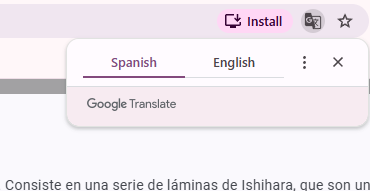
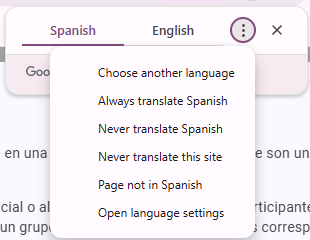
Browsers do provide a solution: the user may select "Never translate Spanish" or "Never translate this site". However, this requires your target users to do extra step.
If the PWA is wrapped in Android app and iOS app, the auto prompt for translation won't kick in.

Installed PWA on Home Screen may get away from such problem, with some limitation depending on how the localized app is developed.

Usage
Chrome, Edge, and Firefox by default will popup significantly the translation offer, while Safari is slightly more passive in presentation. Though technically the users may change the browser's settings, however as the app vendor for the sake of overall UX, you may want your app to handle the situation as much as possible without requiring the users to change browser's settings.
- Use when some target users may visit the PWA Website in a regular browser tab, not installed.
- The PWA is built on Angular, which endorse multiple localized builds. Within the same installed PWA, you need to switch among translation, and you don't want to install each localized build.
Solution
In the Webpage, typically "index.html":
<html lang="es" translate="no">
<head>
  <meta name="google" content="notranslate">
  ...
</head>
translate="no"on<html>is the standard HTML attribute telling any translation tool ("Google Translate", but Edge respects it too) not to touch the page.<meta name="google" content="notranslate">is Chrome/Google Translate's own legacy signal and reinforces the same thing.


Remarks:
- As of August 2026, Firefox does not support this solution. This is tracked as an open bug (Bugzilla #1969828) rather than intended behavior, so there's no reliable page-level opt-out in Firefox right now. The only way around it is user-side: setting browser.translations.automaticallyPopup to false in about:config prevents the translation pop-up panel from opening, or the user can pick "Never translate this site" from the translate icon — but you can't trigger that from your app's code.
- Even if the installed app is based on Chrome, within the installed app in Spanish, the user switches to German, Chrome may still popup the translation offer.
Rationale
PWA wrapped in Android app (via PWABuilder/TWA) wraps the PWA site in a Trusted Web Activity, which renders through Chrome but strips out all of Chrome's browser UI (address bar, menus, infobars). The translate prompt is part of that UI, so it won't appear here at all.
PWA wrapped in iOS app (via PWABuilder/TWA) wraps the PWA site in a WKWebView. Safari's translate feature is tied to Safari's own browser chrome; a WKWebView-based app doesn't get Safari's toolbar or its translate button/prompt. So this is a non-issue on iOS too.
Therefore, without applying the solution, your target users will get the desired UX.
Therefore, with the following design, you may deliver less user interactions, some of which may be wasteful, thus offer better UX.
- Wrapped in native Android app and iOS app.
- PWA installation as app.
- The solution suggested in this article.
Not bulletproof in all scenarios, however, statically you offer better UX.
Known Uses
Language-learning apps (Duolingo, Babbel)
These apps show target-language UI is the entire point, so auto-translation back to the user's native tongue would actively undermine the product.
Brand/regional Websites or Web apps
A company deliberately serves German UI to German-market users regardless of individual browser locale, for consistency.
Ishihara Color Blind Test
The app provides localized GUI and content, and expect many users use the localized app through a browser defaulting in English.
- https://cbt.fonlow.org/
- https://play.google.com/store/apps/details?id=com.fonlow.colorblindtest
- https://apps.apple.com/au/app/ishihara-color-blind-test/id6772382532
https://cbt.fonlow.org/ is behind the native mobile apps.
Related Patterns
The translation offer built into modern web browsers is well documented and clearly qualifies as a UX design pattern, consistently implemented across mainstream browsers. I'd call it "Translation Offer on Language Detection." This pattern also supports an opt-out mechanism for developers who need to override the default behavior in specific contexts, which is what "Do Not Translate" (counter-pattern) is based on.
References
1. WHATWG HTML spec — lang attribute and translate attribute
- The formal spec section is "The lang and xml:lang attributes" (§3.2.5.2) and, directly adjacent, "The translate attribute" (§3.2.5.3), both in the WHATWG Living Standard: https://html.spec.whatwg.org/multipage/dom.html#the-translate-attribute
- The HTML Standard organizes these as consecutive sections: 3.2.5.2 The lang and xml:lang attributes, and 3.2.5.3 The translate attribute.
- MDN's developer-friendly restatement of the
langattribute: the lang global attribute helps define the language of an element — the language non-editable elements are written in, or that editable elements should be written in by the user — containing a single BCP 47 language tag. (https://developer.mozilla.org/en-US/docs/Web/HTML/Reference/Global_attributes/lang) - MDN on
translate="no": the translate global attribute is an enumerated attribute specifying whether an element's translatable attribute values and text-node children should be translated when the page is localized, with values of empty/"yes" (translate) or "no" (must not translate) — and while not all browsers recognize it, it's respected by automatic translation systems like Google Translate. (https://developer.mozilla.org/en-US/docs/Web/HTML/Reference/Global_attributes/translate)
2. Chrome's Translate feature documentation
- The original Chromium design doc describing the detect → infobar mechanism: the Translate feature aims to let users translate a page's text when it isn't in the language Chrome is configured with, working with the Google Translate server; pages can opt out via a meta tag with name "google" and content "notranslate," and once the renderer determines page content, it sends a language-determined notification that triggers the TranslateManager to show the translate infobar if applicable. (https://www.chromium.org/developers/design-documents/translate/)
- Chrome's current developer docs have moved toward the on-device Translator API rather than a dedicated classic-feature page: https://developer.chrome.com/docs/ai/translator-api
3. W3C Internationalization (i18n) guidance
- W3C's own test suite and guidance on language declarations: https://www.w3.org/International/geo/html-tech/tech-lang.html — this explains that declaring the default text-processing language is important for accessibility and search applications, and recommends always declaring a language in the html tag since only one language can be set at a time via attributes.
- W3C's empirical test results on how translation services actually honor
translate="no": all online translation services tested recognized the translate attribute when set to "no" and left the corresponding text untranslated. (https://www.w3.org/International/i18n-tests/results/translation-services)
One honest note: the WHATWG spec and MDN pages are strong primary sources. The Chromium design doc is credible but dated (early Translate-feature architecture, not necessarily current implementation). Firefox has no equivalent public spec-level doc for this specific behavior — that's a real gap, not an oversight on my part.